Support Ops

Learn to be a customer support pro.

  • Episodes
  • Manifesto
  • Best Of

Customer Support Tools to Use With Your Support App

April 8, 2013 By Chase Clemons Leave a Comment

Every support team relies on some central support app, which can be any flavor from an email focused one like Help Scout to a downloadable one like HelpSpot. But what about other apps and tools that will help you support team even more?

This series is going to look at a few of those apps. These will be apps and products that aren’t core to interacting with a customer but do help make it easier on the customer and the support team in some way.

A few that we’ll cover:

  1. Paste Vault
  2. Gaglers
  3. Hively
  4. Text Expander
  5. Twitspark
  6. Olark
  7. UserVoice Touchpoint Toolkit

If you use one that’s not listed here, I’d love to add your review to the list. Just get in touch with me here.

It’s Okay to Make Mistakes

April 2, 2013 By Chase Clemons 2 Comments

Mistakes used to terrify me. At my last job, we had these checklists to open and close the restaurant. 30 to 40 individual steps that you had to go through to properly open and close each day. I’d be so scared of missing one, I’d go through that checklist at least four times to make sure nothing was missed. Great for general manager because he knew the list would be finished. But it was terrifying for me because my only thought was “What if I missed one?”

I was talking about it with one of the other managers at lunch and mentioned how much I hated those checklists. He stopped eating, looked up, and said:

It’s okay to make a mistake. It’s not surgery. We’re just making sandwiches.

When it comes to customer support, you’re going to make mistakes a long the way. You might be in a hurry and overlook something. You might give someone outdated info. You might even spell the customer’s name wrong! (Been there, done that, and got the t-shirt.)

Just make sure to grow from it. To make sure I don’t spell a customer’s name wrong, I copy and paste it from their email to me. It makes sure I get it right every time.

Don’t let the fear of making a mistake control your life. Remember, you’re just making sandwiches or answering emails.

Make a mistake. Learn from it. It’s as easy as that.

Support-o-matic 2.0

April 1, 2013 By Chase Clemons 1 Comment

Delivering great customer support is tough. First you have to design a help site that actually helps people. Then you have to hire people who can actually talk to customers. Don’t you wish there was an easier way?

Turns out, there is.

Meet Support-o-matic 2.0.

support o matic

(Don’t ask about version 1. It’s a touchy subject around here.)

Working with some great partners, we created a way for customers to help themselves without ever needing anything from your team.

Here’s how it works.

1) You create an app or product.

2) Customers buy your app and then if they need help, they buy Support-o-matic 2.0.

3) You make money off both your product and Support-o-matic 2.0 all while saving over an expensive customer support team.

From the customer’s end, using it is easy. Whenever they have a question, they just grab a co-worker and place their hands on the answer key. They ask the question aloud and watch as Support-o-matic 2.0 spells out the answer. Easy as that!

Here’s some testimonials from our beta users.

“I was hesitant at first but Support-o-matic answered every question we threw at it. And best of all, I got the answers right away! No waiting on someone else for a reply.” – Kevin B.

“It’s so much easier than having to search around a website. I just ask my question and then get an answer.” – Amanda L.

“Support-o-matic saved my company enough money to buy us a corporate yacht! Goodbye cold winters. Hello sunny islands!” – Susan C.

Get your copy today.

List 3 Things That Made You Happy This Week

March 29, 2013 By Chase Clemons Leave a Comment

There’s so much talk of happiness going on these days. Everyone wants to make sure your customers are happy, your employees are happy, and your pets are happy. It’s easy to be cynical about it.

But the truth is, happiness is important. Happy employees outperform their less than happy counterparts. Happy customers stick around with you instead of leaving for some other company. And happy pets, well… they just have more fun.

Let’s talk about you.

Work can be tough sometimes. Anytime you deal with customers, it’s challenging. You get three rough customers back to back and it feels like you’re not doing anything right.

Instead of letting those customers rain on your parade, stop and look at what’s made you happy this week.

Before you leave work today, make a list of three things that made you happy this week. It can be big things like rolling out a new design for your help site. It can be small things like the thank you card the customer sent you. Anything at all as long as it’s three things that made you a little happier.

Go on. Write them down. I’ll wait.

Got them?

Feels great, right? Often, we’ll only remember the negative interactions we had with customers and our team from work. Even if you had ten or twenty people who loved you, that one who didn’t will stick out in our minds. Writing these down will help you remember those happy ones whenever you start focusing on just the negative one.

You’re a customer support professional. You’re job is to help people and make them happy. Don’t lose your happiness along the way.

What three things made you happy this week?

How to Handle the Popular Feature Requests

March 28, 2013 By Chase Clemons 6 Comments

When you’re building an app to scratch an itch, it’s easy to design and launch new features and tools that you need. But once you starting gaining customers, they’re going to have their own set of needs that hopefully your app can fulfill. Most will be along the lines of the same itch that you’re scratching but sometimes they’re unique.

Enter the feature request.

I’ve talked about how to handle those emails to a customer here. This time, let’s talk about what to do with them.

Keep a list of the most common ones someplace your team can see it. For us at 37signals, we pick three of the most common requests / pain points from our customers and put them in a project. We include links to cases from customers, examples of what they’re saying, and even screenshots. Anything to give the rest of the team a clear picture.

From there, we do a quick demo of each of those at the company meetup. Everyone is in the same room so it’s a prime opportunity to talk about how to fix them.

We also include info on those top three in our weekly heartbeats to the rest of the team. That way, it stays on everyone’s radar the entire time.

You’ve got to keep them in sight.

That’s the biggest thing. You can use boards, lists, or even a dancing cat that announces the top ones. You’ve just got to keep them in sight for the rest of the team to see.

What ways do you make sure the top customer feature requests stay in sight?

Help Scout App Review

March 25, 2013 By Chase Clemons Leave a Comment

Help Scout does one thing really, really well – provide the best way to do email support. The team focuses on that first as the driving force behind their product. And I gotta say, they do it well. Help Scout Three

The App Itself

Since they focus on email, most of your customers won’t even see you’re using it. Messages to your customers look just like regular email. That means your customers won’t need to learn some complicated support tool just to get help. On your team’s side, you’ll be able to set up customer profiles as expected. It’ll keep track of the past conversations you’ve had with them. Adding notes to a case works just like you would expect, which will let you communicate with your team without the customer seeing those notes. help scout note Being focused on email with this app means that you won’t be using this for other support channels like Twitter or Facebook. That can be a pretty big drawback if you’re using those channels aggressively. But if you’re just using email, this app’s great.
Resources

One thing I love about the Help Scout team is their focus on helping you get better at customer support. It’s something that led me to work with them when releasing my own guide for writing better emails. Their resources page is top-notch. From ebooks to guides to online classes, they help you know your customer better, which means you can support them better. Win-win for everyone.

Pricing

They’re really generous with their entirely free plan. It’s 3 users, one mailbox, and comes Help Scout branded. But it’s free so that’s a good trade-off there. Beyond that, it’s really simple. Each user is $15 per month. Unlimited emails, unlimited storage, a plethora of integrations, and free support from their great support team.

Final verdict

A solid contender in the support app space. The app’s great for focusing on email support. The support team behind it is fantastic. Go check it out for yourself here.

This is part of the Customer Support App Review series. Read more articles in the series.

When to Disappoint Your Customers

March 22, 2013 By Chase Clemons Leave a Comment

Frances Frei, Harvard Business School professor, explains why trying to offer great customer service so often backfires.

SupportBee Review

March 19, 2013 By Luke Francl 1 Comment

At Swiftype, we take pride in the quality of our support. We want our customers to be confident that when they choose Swiftype, we will back them up. We are a small company, and everyone does support, including the engineers. We think this is important because it exposes developers to the problems customers are facing and uncovers bugs. Support requests are how software gets better.

When I started at Swiftype as the first employee, the founders were doing support with a shared Gmail inbox. Even with just a few people, this was clearly unworkable, so I started evaluating support software. My goal was to find software that would let us all share email support duties.

I initially looked at Desk.com and Zendesk. While I was trialing those two, I heard about SupportBee from Hacker News and decided to try it as well. (Disclaimer: SupportBee uses Swiftype but we were not aware of that when we started using their product.)

Note: these observations are based on when I evaluated the services, Fall 2012.

It’s Just Email. But it really works.

I was disappointed with Zendesk and Desk.com’s HTML email support. Zendesk strips HTML entirely. It is a long-standing issue (Note: apparently there is now a way to view the original email in Zendesk). Desk.com allows you to log into the web UI and see the HTML email but doesn’t send it to you.

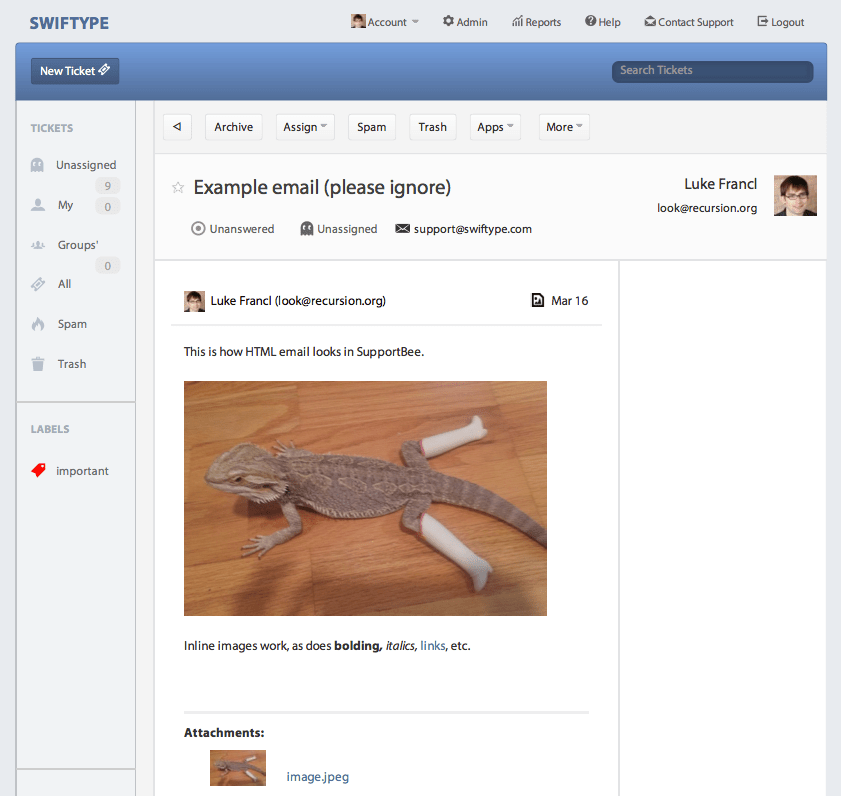
SupportBee’s HTML email support is superb. The emails are delivered pretty much exactly as the original email looked with a small header added. Even inline images work. You can also view HTML emails online (though the styling of the web application can cause them to look slightly off).

Example of a SupportBee support request as it is displayed in Gmail.

SupportBee allows you to use an email-based workflow. You can reply to the support request as a normal email and it will be stored on SupportBee and then sent to the customer. Replying to support requests includes any HTML formatting, attachments, and inline images. It really works.

One feature I wish SupportBee had was some way of stopping duplicate replies (I believe HelpScout has something like this, but I haven’t tried it). We are dealing with this by following a support schedule.

If you need integrated Twitter, Facebook, or phone support, SupportBee probably isn’t for you. But if you work primarily with email support and want to have an inbox-centered workflow, I recommend checking it out.

Web UI

Of the three support software products I trialed, Zendesk had by far the snappiest web user interface. It was very smooth and fluid. Desk.com on the other hand felt slow and clunky. SupportBee falls between the two. It’s not quite as zippy as Zendesk but smoother than Desk.com. I usually use SupportBee from my inbox, but you need to log in to assign tickets or leave a comment.

The SupportBee web UI for a support request.

API

SupportBee has a developer API. We are currently using it to post a comment on the support ticket with customer information from our database when we receive a support request. This gives us quick access to that customer’s details in our administrative dashboard.

Pricing

SupportBee’s pricing really works well for companies that want to do full-company support because you pay per ticket instead of per agent. Prices start at $19/month for 300 tickets a month (a ticket is like a thread in Gmail, replies are not counted as new tickets).

You can sign up for SupportBee here.

This is part of the Customer Support App Review series. Read more articles in the series.

The On Call Programmer

March 14, 2013 By Chase Clemons 5 Comments

In a perfect world, your support team would be able to handle anything thrown at it. Need a bug fixed within the app? Easy. How about an account restored from a backup? Done. You’d be like Iron Man saving your customer’s day while inside that snazzy armor.

In the real world, you’re going to need a programmer to work with. And no – it’s not going to be Jarvis. (Alright, I’ll stop with the superhero talk).

But how do you steal a programmer away to work on the things you need help with?

Enter the On Call Programmer

An On Call programmer works primarily with support during the week, two weeks, or whatever amount of time you want to set for the stretch. During that time, they can handle those pesky bugs and other things that crop up with customer emails. After the cases are cleared out, they can work on other things to help out the support team like new internal tools, better access to data, etc.

The big thing is that the On Call programmer is there to help support first and foremost. They’ll get a chance to see firsthand some of the common customer issues. And you’ll get a programmer to ask questions without interrupting their work on other projects.

The Flow

Here’s how it works in practice.

  • You get a case that needs to be run by a programmer. You add a note with your question and assign it an “on call” label.
  • The programmer opens the case, does what’s needed, then leaves a note on it. Then they flip the case back to you.

And that’s it. Super easy on both sides. The programmer can handle each case as it comes through the queue. It’ll make the support team / programmer team interactions way easier for everyone involved.

Do you have a dedicated programmer for support help or do you just grab anyone that’s free?

Help the Customer be Awesome

March 7, 2013 By Chase Clemons Leave a Comment

Help the customer be awesome

LOOK! LOOK AT US!

Most companies never focus on the customer beyond getting them to buy their product or service. When it comes to Facebook, Twitter, and the like, this only gets amplified.

From Tom (the guy behind that cartoon):

Whether in social media or any other domain, we need to focus less on how “awesome” we are and more on working toward making our customer’s more “awesome”.

I’m here to help the customer be more awesome using our app. I could care less if they click the like button on Facebook or follow us on Twitter.

How are you helping your customers to be more awesome?

  • « Previous Page
  • 1
  • …
  • 5
  • 6
  • 7
  • 8
  • 9
  • …
  • 14
  • Next Page »
A weekly podcast that helps you deliver a better support experience to your customers.

Read Our Guides
Support Kit
A Brief Guide to a Better Email

Find a Specific Episode

Copyright © 2026 Support Ops

Loading Comments...